Administrācija
This chapter describes administrative tasks for users with the Administrator role. Please refer to chapter Roles to learn more about the role.
Svarīgi
Pirms darba uzsākšanas izlasiet informāciju, kas sniegta šā dokumenta sākumā.
Sistēmas pārvaldība
Informācija par ierīci
Pārdevēja un produkta informāciju par NetHSM var iegūt šādi.
Piemērs
$ nitropy nethsm --host $NETHSM_HOST info
Host:    localhost:8443
Vendor:  Nitrokey GmbH
Product: NetHSM
Information about the /info endpoint can be found in the API documentation.
Startēšanas režīms
NetHSM var izmantot Attended Boot un Unattended Boot režīmā.
Startēšanas režīms |
Apraksts |
|---|---|
Apmeklēts Boot |
The NetHSM boots up into a Locked state. The Unlock Passphrase needs to be entered during each start, which is used to decrypt the User Data. For security reasons, this mode is recommended and it’s the default mode for a freshly provisioned system. |
Bez uzraudzības palaists Boot |
The system starts unattended without the need to enter the Unlock Passphrase into an Operational state. Use this mode if your availability requirements can not be fulfilled with Attended Boot mode. |
Brīdinājums
Neatkarīgi no sāknēšanas režīma atbloķēšanas parole saglabā savu derīgumu, un tā ir nepieciešama, lai atjaunotu dublējumus citā aparatūrā. Jebkurā laikā glabājiet atbloķēšanas paroli drošībā.
Pašreizējo sāknēšanas režīmu var iegūt šādi.
Piemērs
$ nitropy nethsm --host $NETHSM_HOST get-config --unattended-boot
Configuration for NetHSM localhost:8443:
   Unattended boot: off
Information about the /config/unattended-boot endpoint can be found in the API documentation.
Startēšanas režīmu var mainīt šādi. Nākamajā bootēšanas reizē NetHSM darbosies atbilstoši.
Argumenti
Arguments |
Apraksts |
|---|---|
Statuss |
Ieslēgt vai izslēgt Unattattended Boot. Var būt vērtība |
Piemērs
$ nitropy nethsm --host $NETHSM_HOST set-unattended-boot on
Updated the unattended boot configuration for NetHSM localhost:8443
Information about the /config/unattended-boot endpoint can be found in the API documentation.
Valsts
The NetHSM software has five states: Unprovisioned, Provisioned, Locked, Operational and Failed.
Valsts |
Apraksts |
|---|---|
Neprovizēts |
NetHSM bez konfigurācijas (rūpnīcas noklusējuma iestatījumi) |
Paredzēts |
NetHSM ar konfigurāciju. Provisioned stāvoklis nozīmē vai nu Operational, vai Locked stāvokli. |
Darbs |
NetHSM ar konfigurāciju un gatavs izpildīt komandas. Darbības stāvoklis nozīmē Provisioned stāvokli. |
Locked |
NetHSM ar konfigurāciju, bet šifrētiem un nepieejamiem datu krājumiem. Parasti nākamais solis ir sistēmas atbloķēšana. No Locked stāvokļa izriet Provisioned stāvoklis. |
Failed |
NetHSM ar datubāzi, kas pašlaik nav pieejama (sk. Recovery). |
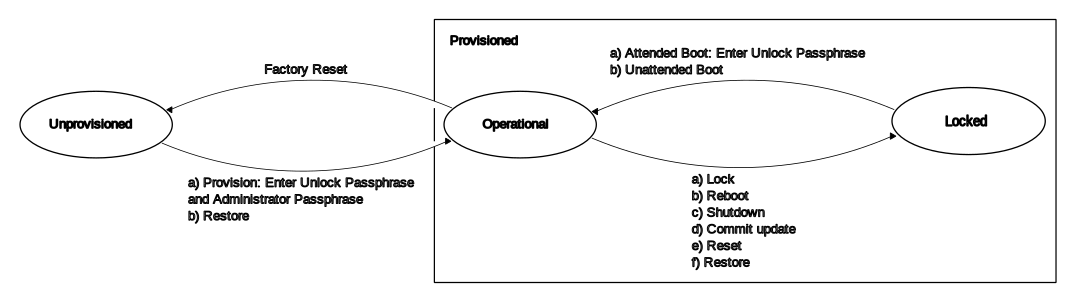
NetHSM stāvokļi un pārejas
NetHSM pašreizējo stāvokli var iegūt šādi.
Piemērs
$ nitropy nethsm --host $NETHSM_HOST state
NetHSM localhost:8443 is Unprovisioned
Information about the /health/state endpoint can be found in the API documentation.
A new NetHSM has an Unprovisioned state and after provisioning enters the Operational state. The provisioning of a NetHSM is described in the chapter Provisioning.
NetHSM, kas atrodas darbības stāvoklī, var atkal bloķēt, lai to aizsargātu šādi.
Piemērs
$ nitropy nethsm --host $NETHSM_HOST lock
NetHSM localhost:8443 locked
Information about the /lock endpoint can be found in the API documentation.
A NetHSM in Locked state can be unlocked as follows. While the NetHSM is in the Locked state no other operations are possible. Afterwards the NetHSM is in an Operational state.
Piemērs
$ nitropy nethsm --host $NETHSM_HOST unlock
NetHSM localhost:8443 unlocked
Information about the /unlock endpoint can be found in the API documentation.
Atslēgt paroli
Atbloķēšanas paroli izmanto, lai iegūtu Atbloķēšanas atslēgu, ja NetHSM ir Abloķēts stāvoklī. Frāzi sākotnēji nosaka NetHSM nodrošināšanas laikā.
Brīdinājums
Atbloķēšanas paroli nevar atiestatīt, nezinot pašreizējo vērtību. Ja atbloķēšanas parole tiek pazaudēta, to nevar ne atiestatīt uz jaunu vērtību, ne arī atbloķēt NetHSM.
Atbloķēšanas paroli var iestatīt šādi.
Vienreizējas opcijas
Iespēja |
Apraksts |
|---|---|
|
Jaunā atbloķēšanas parole |
|
Pašreizējā atbloķēšanas parole |
|
Pirms paroles frāzes maiņas nelūdziet apstiprinājumu. |
Piemērs
$ nitropy nethsm --host $NETHSM_HOST set-unlock-passphrase
New passphrase:
Repeat for confirmation:
Current passphrase:
Warning: The unlock passphrase cannot be reset without knowing the current value. If the unlock passphrase is lost, neither can it be reset to a new value nor can the NetHSM be unlocked.
Do you want to continue? [y/N]: y
Updated the unlock passphrase for NetHSM localhost:8443
Information about the /config/unlock-passphrase endpoint can be found in the API documentation.
TLS sertifikāts
The TLS certificate is used for the HTTPS-based REST API, and is therefore also used by nitropy. During provisioning a self-signed certificate is created. The certificate can be replaced, for example with a signed certificate from a certificate authority (CA). In this case a Certificate Signing Request (CSR) must be generated. After signing the certificate must be imported to the NetHSM.
A change is only necessary when the certificate is to be replaced. Such change may be to replace it with a signed certificate from a certificate authority (CA).
TLS sertifikātu var iegūt šādi.
Nepieciešamās opcijas
Iespēja |
Apraksts |
|---|---|
|
Get the certificate for the NetHSM TLS interface |
Piemērs
$ nitropy nethsm --host $NETHSM_HOST get-certificate --api
-----BEGIN CERTIFICATE-----
MIIBHzCBxaADAgECAgkA7AznVQK3XWkwCgYIKoZIzj0EAwIwFDESMBAGA1UEAwwJ
a2V5ZmVuZGVyMCAXDTcwMDEwMTAwMDAwMFoYDzk5OTkxMjMxMjM1OTU5WjAUMRIw
EAYDVQQDDAlrZXlmZW5kZXIwWTATBgcqhkjOPQIBBggqhkjOPQMBBwNCAARbeCRl
F1ZIjK1bTfrPvtCoYDThMjdV1q8mq+B9FMDo4GIahTCUG/Ub6bCOcbip5pP92J3h
yMEcPuos72c1KcGjMAoGCCqGSM49BAMCA0kAMEYCIQC/BNrkCM5gpsVfa9EqQcM0
PCaADyZG7KKLgDv7asa5LwIhAKDXRE3Tdm9tYObO0X4p0CRQkl1+DnvGljzQe34C
JBax
-----END CERTIFICATE-----
Information about the /config/tls/cert.pem endpoint can be found in the API documentation.
TLS sertifikātu var ģenerēt šādi.
Nepieciešamās opcijas
Iespēja |
Apraksts |
|---|---|
|
Izveidotās atslēgas tips |
|
Ģenerētās atslēgas garums |
Piemērs
$ nitropy nethsm --host $NETHSM_HOST generate-tls-key -t Curve25519
Key for TLS interface generated on NetHSM localhost:8443
Information about the /config/tls/generate endpoint can be found in the API documentation.
Sertifikāta parakstīšanas pieprasījumu (CSR) sertifikātam var ģenerēt šādi.
Nepieciešamās opcijas
Iespēja |
Apraksts |
|---|---|
|
NetHSM TLS sertifikāta CSR ģenerēšana |
|
Valsts nosaukums |
|
Valsts vai provinces nosaukums |
|
Vietas nosaukums |
|
Organizācijas nosaukums |
|
Organizācijas vienības nosaukums |
|
Vispārpieņemtais nosaukums |
|
E-pasta adrese |
Piemērs
$ nitropy nethsm --host $NETHSM_HOST csr --api --country="DE" --state-or-province="Berlin" --locality="Berlin" --organization="Nitrokey" --organizational-unit="" --common-name="Nitrokey" --email-address="info@nitrokey.com"
-----BEGIN CERTIFICATE REQUEST-----
MIGBMDUCAQAwAjEAMCowBQYDK2VwAyEAE+nz+nOj80SWG25UbqVcQk6Ua84zuj5B
9qCtPpDUX2qgADAFBgMrZXADQQDwk9LrYDu83a1jgBGqW0I9BVXWEhP4gZLxlVV+
c102GFi963ZPIxG7Z5+uWplz+wr/Vmr7KLr6oM01M/AZPJQO
-----END CERTIFICATE REQUEST-----
Information about the /config/tls/csr.pem endpoint can be found in the API documentation.
Sertifikātu var aizstāt šādi.
Nepieciešamās opcijas
Iespēja |
Apraksts |
|---|---|
|
NetHSM TLS saskarnes sertifikāta iestatīšana |
Argumenti
Arguments |
Apraksts |
|---|---|
|
Sertifikāta fails |
Piemērs
nitropy nethsm --host $NETHSM_HOST set-certificate --api /tmp/nethsm-certificate
Information about the /config/tls/csr.pem endpoint can be found in the API documentation.
TLS Cluster Certificate
Izpildiet soļus, kas aprakstīti šeit: TLS Certificate, taču vietā –api izmantojiet –cluster, un vietā /config/tls izmantojiet /cluster/tls.
Ja nepieciešams, atjaunojiet TLS klastera atslēgu visos NetHSM mezglos, kurus vēlaties iekļaut klasterī. Veicot atjaunināšanu no programmatūras versijas 5.0 vai vecākas, TLS klastera atslēga būs identiska TLS API atslēgai, lai nodrošinātu atpakaļsaderību klastera atjaunināšanas laikā. Jaunizveidotajam NetHSM būs atšķirīgas TLS API un klastera atslēgas.
Atslēgas atjaunošanu var veikt tikai tad, ja nav instalēts klastera sertifikātu izsniedzējs (Cluster CA), tāpēc ieteicams vispirms veikt šo darbību:
Generate new TLS cluster key
Nepieciešamās opcijas
Iespēja |
Apraksts |
|---|---|
|
Required to regenerate the cluster key |
|
Izveidotās atslēgas tips |
|
Ģenerētās atslēgas garums |
Piemērs
$ nitropy nethsm --host $NETHSM_HOST generate-tls-key --cluster -t Curve25519
Key for TLS interface generated on NetHSM localhost:8443
Information about the /cluster/tls/generate endpoint can be found in the API documentation.
Create a Certificate Signing Request (CSR) for the cluster certificate
Nepieciešamās opcijas
Opcija | Apraksts |
|
|---|---|
|
|
|
|
|
|
|
|
|
|
|
|
|
|
|
|
|
Piemērs
$ nitropy nethsm --host $NETHSM_HOST csr --cluster --country="DE" --state-or-province="Berlin" --locality="Berlin" --organization="Nitrokey" --organizational-unit="" --common-name="Nitrokey" --email-address="info@nitrokey.com" --san 172.22.1.2 --san 172.22.1.3 --san 172.22.1.4 --san 172.22.1.5
-----BEGIN CERTIFICATE REQUEST-----
MIHGMHoCAQAwEzERMA8GA1UEAwwITml0cm9rZXkwKjAFBgMrZXADIQCJkTKg4k0+
2dhjasXu46CxSOvDz5XEYryqKgaDn8zt96A0MDIGCSqGSIb3DQEJDjElMCMwIQYD
VR0RBBowGIcErBYBAocErBYBA4cErBYBBIcErBYBBTAFBgMrZXADQQDtcPwf6Pj5
ZkSB+/p77RZp0yYZCWZP3VYqtnxQ4/UNPwjrkKrQrHBdv0DB1s7F2tZ5nsHeaVnN
HlgxmvJOCCEJ
-----END CERTIFICATE REQUEST-----
Information about the /cluster/tls/csr.pem endpoint can be found in the API documentation.
Lūdziet savu sertifikātu izsniedzēju parakstīt CSR. Ja izmantojat pašparakstītu sertifikātu, pieņemot, ka CSR atrodas failā nethsm.csr:
$ openssl x509 -req -days 1825 -in nethsm.csr -CA CA.pem -copy_extensions copy \
    -CAkey CA.key -out new_cert.pem -set_serial 01 -sha256
uzstādiet iegūto
new_cert.pem
Nepieciešamās opcijas
Opcija | Apraksts |
|
|---|---|
|
Argumenti
Arguments |
Apraksts |
|---|---|
|
Sertifikāta fails |
Piemērs
nitropy nethsm --host $NETHSM_HOST set-certificate --cluster /tmp/nethsm-certificate
Information about the /cluster/tls/csr.pem endpoint can be found in the API documentation.
instalējiet CA sertifikātu (tas jādara pēc parakstītā sertifikāta instalēšanas, citādi parādīsies kļūda)
Argumenti
Arguments |
Apraksts |
|---|---|
|
The path of the CA file |
Piemērs
$ nitropy nethsm --host $NETHSM_HOST set-cluster-ca-certificate CA.pem
Uzstādīto klastera CA var atrast, izmantojot komandu ` `` nitropy nethsm –host $NETHSM_HOST get-cluster-ca-certificate`.
Information about the /cluster/tls/ca.pem endpoint can be found in the API documentation.
Piezīme
Šis process ir jāatkārto katram mezglam.
Tīkls
Tīkla konfigurācija nosaka iestatījumus, kas tiek izmantoti tīkla portam.
Piezīme
This settings do not configure the BMC Network Port on the NetHSM 1.
Tīkla konfigurāciju var iegūt šādi.
Nepieciešamās opcijas
Iespēja |
Apraksts |
|---|---|
|
Pieprasīt tīkla konfigurāciju |
Piemērs
$ nitropy nethsm -h $NETHSM_HOST get-config --network
Configuration for NetHSM localhost:8443:
Network:
      IP address:    192.168.1.1
      Netmask:       255.255.255.0
      Gateway:       0.0.0.0
      IPv6 CIDR:     de:ad:be:ef::42/64
      IPv6 Gateway:  de:ad:be:ef::1
Piezīme
IPv6 lauki tiek parādīti tikai tad, ja ir konfigurēts IPv6.
Information about the /config/network endpoint can be found in the API documentation.
Iestatiet tīkla konfigurāciju šādi.
Piezīme
NetHSM neatbalsta DHCP (Dinamiskais hostu konfigurācijas protokols).
Piezīme
IPv6 nav obligāts un pēc noklusējuma nav konfigurēts. Lai atslēgtu IPv6, izlaidiet --ipv6-cidr un --ipv6-gateway opcijas.
Nepieciešamās opcijas
Iespēja |
Apraksts |
|---|---|
|
Jaunā IP adrese |
|
Jaunā tīkla maska |
|
Jaunie vārti |
Vienreizējas opcijas
Iespēja |
Apraksts |
|---|---|
|
IPv6 adrese CIDR formātā (pēc izvēles) |
|
IPv6 vārtejas adrese (pēc izvēles) |
Piemērs
$ nitropy nethsm -h $NETHSM_HOST set-network-config \
   -a 192.168.1.1 -n 255.255.255.0 -g 0.0.0.0 \
   --ipv6-cidr "de:ad:be:ef::42/64" \
   --ipv6-gateway "de:ad:be:ef::1"
Updated the network configuration for NetHSM localhost:8443
Information about the /config/network endpoint can be found in the API documentation.
Lai konfigurētu IPv6, iekļaujiet izvēles ipv6 lauku ar cidr un gateway īpašībām. Lai atspējotu IPv6, izlaidiet ipv6 lauku.
Laiks
NetHSM programmatūras sistēmas laiku var iestatīt vai nu manuāli, vai automātiski, konfigurējot NTP vai NTS serveri.
The current system time can be retrieved as follows.
Nepieciešamās opcijas
Iespēja |
Apraksts |
|---|---|
|
Vaicāt sistēmas laiku |
Piemērs
$ nitropy nethsm -host $NETHSM_HOST get-config --time
Configuration for NetHSM localhost:8443:
Time:            2022-08-17 11:40:00+00:00
Information about the /config/time endpoint can be found in the API documentation.
The current system time can be manually adjusted as follows. Note that manually setting the clock is usually not required to set the system time, as it is set during provisioning. If NTP/NTS is configured, the manually set time will be eventually overridden by the server’s time.
Svarīgi
Pārliecinieties, ka laiks ir norādīts UTC laika joslā.
Argumenti
Arguments |
Apraksts |
|---|---|
|
Iestatāmais sistēmas laiks (formāts: GGGGG-MM-DDTHH:MM:SSZ) |
Piemērs
$ nitropy nethsm -h $NETHSM_HOST set-time 2022-08-17T11:40:00Z
Updated the system time for NetHSM localhost:8443
Information about the /config/time endpoint can be found in the API documentation.
NTP/NTS
NTP serveri var konfigurēt tā, lai tas automātiski pielāgotu NetHSM sistēmas laiku. Pēc izvēles var ieslēgt NTS (Network Time Security).
The current NTP configuration can be retrieved as follows.
Nepieciešamās opcijas
Iespēja |
Apraksts |
|---|---|
|
Query the NTP configuration |
Piemērs
$ nitropy nethsm -h $NETHSM_HOST get-config --ntp
NTP:
   NTP Server IP: 1.2.3.4
   NTS Name:      not configured
Information about the /config/ntp endpoint can be found in the API documentation.
NTP/NTS var konfigurēt šādi. To var atspējot, atstājot laukus tukšus.
Piezīme
NTP serveris ir jānorāda pēc tā IP adreses (vai nu v4, vai v6), nevis pēc servera nosaukuma.
Vienreizējas opcijas
Iespēja |
Apraksts |
|---|---|
|
NTP servera IP adrese (v4 vai v6). Ja nav norādīta, tas nozīmē, ka NTP nav konfigurēts. NTS servera uzņēmuma nosaukums (ļauj izmantot Network Time Security). Ja nav norādīts, tas nozīmē, ka NTS nav konfigurēts. |
Piemērs
$ nitropy nethsm -h $NETHSM_HOST set-ntp-config --ntp-ip 1.2.3.4 --nts-name my-nts-server.com
Updated the NTP configuration for NetHSM localhost:8443
Information about the /config/ntp endpoint can be found in the API documentation.
Metrikas
The NetHSM logs metrics of system parameters. Please refer to Metrics to learn more about each metric.
Piezīme
Metriku pieejamība ir atkarīga no platformas. Dažas metrikas ir pieejamas tikai aparatūrā vai programmatūras konteinerā.
Metriku var iegūt šādi.
Nepieciešamā loma
This operation requires an authentication with the Metrics role.
Piemērs
$ nitropy nethsm -h $NETHSM_HOST metrics
Metric                         Value
----------------------------   --------
client connections             0
established state              6
external.received bytes        989931
external.received packets      13239
external.transmitted bytes     25908953
external.transmitted packets   22037
free chunk count               322
gc compactions                 0
gc major bytes                 21348352
gc major collections           35
gc minor collections           2652
http response 200              28
http response 201              1
http response 204              1
http response 400              1
http response 403              1
http response 404              145
http response 412              1
http response time             0.084998
http response total            178
internal.received bytes        66541
internal.received packets      1130
internal.transmitted bytes     63802
internal.transmitted packets   1133
kv write                       2
log errors                     3
log warnings                   3
maximum allocated space        64528384
maximum releasable bytes       1216
mmapped region count           0
new sleeper size               1
non-mmapped allocated bytes    64528384
sleep queue size               11
syn-rcvd state                 0
timers                         2
total allocated space          43940832
total client                   1
total established              515
total free space               20587552
total sleeper size             12
total syn-rcvd                 514
total timers                   526
uptime                         17626
Information about the /metrics endpoint can be found in the API documentation.
Mežizstrāde
The NetHSM can log system events to the serial port or to a syslog server on the network. The syslog server IP address can be an IPv4 or IPv6 address.
Svarīgi
Jebkurā ražošanas izvietojumā NetHSM žurnāls ir nepārtraukti jāuzrauga, lai nekavējoties paziņotu par iespējamām drošības problēmām.
Sizlogservera konfigurāciju var iegūt šādi.
Nepieciešamās opcijas
Iespēja |
Apraksts |
|---|---|
|
Pieprasīt mežistrādes konfigurāciju |
Piemērs
$ nitropy nethsm -h $NETHSM_HOST get-config --logging
Logging:
   IP address:    0.0.0.0
   Port:          514
   Log level:     info
Information about the /config/logging endpoint can be found in the API documentation.
Sizlogservera konfigurāciju var iestatīt šādi.
Nepieciešamās opcijas
Iespēja |
Apraksts |
|---|---|
|
Jaunā mežistrādes galamērķa IP adrese |
|
Jaunā mežistrādes galamērķa osta |
|
Jaunais žurnāla līmenis |
Piemērs
$ nitropy nethsm -h $NETHSM_HOST set-logging-config -a 192.168.0.1 -p 514 -l info
Updated the logging configuration for NetHSM localhost:8443
Information about the /config/logging endpoint can be found in the API documentation.
Brīdinājums
Nekādā gadījumā neizmantojiet žurnāla līmeni debug kā noklusējuma iestatījumu ražošanas vidē. Tas reģistrē konfidenciālu informāciju un samazina sistēmas veiktspēju.
The serial console works right from the start of the NetHSM hardware. It includes events from the NetHSM firmware and the NetHSM software. The serial console is typically only necessary when debugging issues for which the syslog does not provide sufficient information.
The location of the serial port depends on the model of the device. Please refer to the chapter Getting started to locate the port on your model.
The serial console port differences of each model are as follows.
NetHSM 2 izmanto D-sub sievišķo DE-9 pieslēgvietu ar 9 kontaktiem (kontaktu izkārtojums: 5-4). Šis ports atbalsta tikai pārraidi (TX), bet ne saņemšanu (RX).
USB-Serial adapteri var tieši pievienot ierīcei, nav nepieciešams nulles modema kabelis.

D-sub sievišķais DE-9 ports.
NetHSM 1 izmanto D-sub male DE-9 portu ar 9 kontaktiem (kontaktu izkārtojums: 5-4). Pieslēgvieta atbalsta pārraidi (TX) un saņemšanu (RX).
USB-Serial adapteriem ir jāizmanto null modema kabelis, lai tos savienotu ar ierīci.
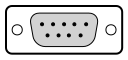
D-sub male DE-9 ports.
Sērijas konsoles savienojuma iestatījumi ir šādi.
Iestatīšana |
Vērtība |
|---|---|
Baud ātrums |
115200 |
Datu biti |
8 |
Stopbiti |
1 |
Paritāte |
Nav |
Plūsmas kontrole |
Nav |
Rezerves kopija
NetHSM Lietotāja datus var saglabāt dublējuma failā. Šajā dublējuma failā ir visi lietotāja dati, proti, konfigurācijas krātuve, autentifikācijas krātuve, domēna atslēgu krātuve un atslēgu krātuve.
Svarīgi
A NetHSM system software in Unattended Boot mode will require the Unlock Passphrase if restored on a different NetHSM hardware. Please refer to chapter Unlock Passphrase to learn more.
Svarīgi
NetHSM, kas darbojas Unattended Boot režīmā, pēc atjaunošanas darbosies tajā pašā režīmā.
Pirms dublēšanas uzsākšanas ir jāiestata Apkopēšanas parole. Aizkopēšanas paroli izmanto, lai šifrētu datus dublējuma failā.
Brīdinājums
Rezerves paroli nevar atiestatīt, nezinot pašreizējo vērtību. Ja rezerves kopijas parole tiek pazaudēta, to nevar ne atjaunot uz jaunu vērtību, ne arī atjaunot izveidotās rezerves kopijas.
Rezerves frāzi var iestatīt šādi.
Vienreizējas opcijas
Iespēja |
Apraksts |
|---|---|
|
Jaunā dublēšanas parole |
|
Pašreizējā dublējuma parole (vai tukša virkne, ja nav iestatīta). |
|
Pirms paroles frāzes maiņas nelūdziet apstiprinājumu. |
Piemērs
$ nitropy nethsm -h $NETHSM_HOST -u admin set-backup-passphrase
New passphrase:
Repeat for confirmation:
Warning: The backup passphrase cannot be reset without knowing the current value. If the backup passphrase is lost, neither can it be reset to a new value nor can the created backups be restored.
Do you want to continue? [y/N]: y
The current backup passphrase (or an empty string if not set) []:
Updated the backup passphrase for NetHSM localhost:8443
Information about the /config/backup-passphrase endpoint can be found in the API documentation.
Rezerves kopiju var veikt šādi.
Nepieciešamā loma
This operation requires an authentication with the Backup role.
Argumenti
Arguments |
Apraksts |
|---|---|
|
Rezerves kopijas fails |
Piemērs
$ nitropy nethsm -h $NETHSM_HOST backup /tmp/nethsm-backup
Backup for localhost:8443 written to /tmp/backup
Information about the /system/backup endpoint can be found in the API documentation.
Atjaunot
NetHSM var atjaunot no dublējuma faila.
If the NetHSM is Unprovisioned it will restore all User Data including system configuration. After the restore the NetHSM is in a Locked state. The restored TLS certificate and Unlock Passphrase are immediately available. The network settings are only applied after a reboot.
Ja NetHSM ir Provisioned, tiks atjaunoti lietotāji un lietotāju atslēgas, bet ne sistēmas konfigurācija. Šādā gadījumā visi iepriekš esošie lietotāji un lietotāju atslēgas tiks dzēsti. NetHSM beidzas Operational stāvoklī.
Atjaunošanu var veikt šādi.
Vienreizējas opcijas
Iespēja |
Apraksts |
|---|---|
|
Aizkopēšanas frāze |
|
Iestatāmais sistēmas laiks (Formāts: |
Svarīgi
Pārliecinieties, vai jūsu vietējā datorā ir pareizi iestatīts laiks. Lai iestatītu citu laiku, lūdzu, norādiet to manuāli.
Argumenti
Arguments |
Apraksts |
|
|---|---|---|
|
||
Piemērs
$ nitropy nethsm -h $NETHSM_HOST restore /tmp/nethsm-backup
Backup passphrase:
Backup restored on NetHSM localhost:8443
Information about the /system/restore endpoint can be found in the API documentation.
Replication
NetHSM ir bezstāvokļa sistēma, tāpēc var izmantot vairākas NetHSM ierīces, lai apstrādātu ārkārtīgi lielu caurlaidspēju un nodrošinātu augstu pieejamību. PKCS#11 modulis atbalsta NetHSM gadījumu kopas apļa grafiku.
Vairākus NetHSM gadījumus var sinhronizēt, izmantojot klasterizāciju vai šifrētu dublējumu.
For the later a separate system downloads and uploads backup files between the instances. The synchronization can be easily scripted by using pynitrokey as shown in this example. This separate system doesn’t have access to the backed up data in clear text because the backup files are encrypted twice. The separate system is in possession of the backup passphrase only but not of the Domain Key resp. Unlock Passphrase which is the second layer of encryption. See the system design for further details.
Programmatūras atjaunināšana
Programmatūras atjauninājumus var instalēt divpakāpju procesā. Vispirms atjauninājuma attēls ir jāielādē Provisioned NetHSM. NetHSM pārbauda attēla autentiskumu, integritāti un versijas numuru. Pēc izvēles NetHSM parāda izlaiduma piezīmes, ja tādas ir.
Brīdinājums
Beta versijas atjauninājuma instalēšanas dēļ var tikt zaudēti dati! Stabilajām versijām nevajadzētu izraisīt datu zudumu. Tomēr pirms atjaunināšanas ieteicams izveidot rezerves kopiju.
Brīdinājums
Ensure you install the correct update file for your hardware model NetHSM 1 or NetHSM 2. You can check your model in the system information.
Atjauninājuma failu var augšupielādēt šādi.
Argumenti
Arguments |
Apraksts |
|---|---|
|
Atjaunināt failu |
Piemērs
$ nitropy nethsm --host $NETHSM_HOST update /tmp/nethsm-update.img.bin
Image /tmp/nethsm-update.img.bin uploaded to NetHSM localhost:8443
Information about the /system/update endpoint can be found in the API documentation.
Pēc tam atjauninājumu var piemērot vai pārtraukt. Lūdzu, skatiet tālāk norādīto vēlamo opciju. Ja NetHSM tiek izslēgts pirms „commit“ operācijas, atjauninājuma fails ir jāielādē vēlreiz.
Svarīgi
Ja atjauninājuma attēla augšupielāde neizdodas ar Error: NetHSM request failed: Bad request -- malformed image, lūdzu, izpildiet tālāk norādītās darbības.
Pārliecinieties, ka ir derīgs atjauninājuma fails, pārbaudot to ar sniegto parakstu.
Make sure you don’t have a high log level, such as
DEBUGenabled. Please refer to chapter Logging to learn more about the log level configuration.Pārstartējiet ierīci, lai atbrīvotu izmantoto atmiņu.
Atjauninājumu var piemērot (izdarīt) šādi. Jebkura datu migrācija tiek veikta tikai pēc tam, kad NetHSM ir veiksmīgi ieviesis jauno sistēmas programmatūras versiju.
Piemērs
$ nitropy nethsm --host $NETHSM_HOST commit-update
Update successfully committed on NetHSM localhost:8443
Information about the /system/commit-update endpoint can be found in the API documentation.
Ja programmatūras atjaunināšana neizdodas, varat to veikt, izmantojot USB zibatmiņu. Lai uzzinātu vairāk, lūdzu, skatiet System Software Update via USB.
Atjaunināšanu var atcelt šādi.
Piemērs
$ nitropy nethsm --host $NETHSM_HOST cancel-update
Update successfully cancelled on NetHSM localhost:8443
Information about the /system/cancel-update endpoint can be found in the API documentation.
Sistēmas informācija
Sistēmas informāciju, piemēram, programmaparatūras versiju, programmatūras versiju un aparatūras versiju, var iegūt šādi.
Piemērs
$ nitropy nethsm -h $NETHSM_HOST system-info
Host:             192.168.1.1
Firmware version: 1.0-prod
Software version: 2.0
Hardware version: prodrive-hermes-1
Build tag:        v2.0-0-g17ad829
Attestation keys
  P256:           MFkwEwYHKoZIzj0CAQYIKoZIzj0DAQcDQgAEup7z8QYvkzkBuLryG1SgVQjlPhSFW3PzYn1l3uLNd+pSBxX0OBpslcbnmPFr5wSs/iP46+H8MFlEAYUkYv6uuQ==
  P384:           MHYwEAYHKoZIzj0CAQYFK4EEACIDYgAEfQiurLvEmjsAmumRtIqu70HKehRo8A/nVrqQGiR8Rcr+SUujwgtQByORX5BoRtv4sZNJW4FyLGqvXCIF9IV1puob2+9Qq5oEjz4x4malLbFdyXDmQK8o2NpvcbgOr215
Platform Configuration Registers
  0:              0f6064779fba55b102a6ecc20498c2020deaf2aebef23716ec293b25873647f8
  2:              2b0d25a4a92b4df5205742954243db9d306a4c3277a6b6958bcbaf3d47def26f
Information about the /system/info endpoint can be found in the API documentation.
NetHSM 1 identificē kā aparatūras versiju prodrive-hermes-1 un NetHSM 2 kā msi-z790-1.
Pārstartēšana un izslēgšana
NetHSM var no jauna iedarbināt un izslēgt vai nu attālināti, vai ar restartēšanas un izslēgšanas pogu NetHSM aparatūras priekšpusē.
Attālo restartēšanu var uzsākt šādi.
Piemērs
$ nitropy nethsm --host $NETHSM_HOST reboot
NetHSM localhost:8443 will be rebooted.
Do you want to continue? [y/N]: y
NetHSM localhost:8443 is about to reboot
Information about the /system/reboot endpoint can be found in the API documentation.
Attālo izslēgšanu var uzsākt šādi.
Piemērs
$ nitropy nethsm --host $NETHSM_HOST shutdown
NetHSM localhost:8443 will be shutdown.
Do you want to continue? [y/N]: y
NetHSM localhost:8443 is about to shutdown
Information about the /system/shutdown endpoint can be found in the API documentation.
Rūpnīcas noklusējuma iestatījumu atiestatīšana
A Provisioned NetHSM can be reset to factory defaults. In this case all user data is securely deleted and the NetHSM boots into an Unprovisioned state. Afterwards, you may want to provision the NetHSM.
Atiestatīšanu uz rūpnīcas noklusējuma iestatījumiem var veikt šādi.
Piemērs
$ nitropy nethsm -h $NETHSM_HOST factory-reset
NetHSM localhost:8443 will be set to factory defaults.
All data will be lost!
Do you want to continue? [y/N]: y
NetHSM localhost:8443 is about to perform a factory reset
Information about the /system/factory-reset endpoint can be found in the API documentation.
Lietotāju pārvaldība
Lomas
NetHSM ļauj nodalīt pienākumus, izmantojot dažādas lomas. Katram NetHSM konfigurētajam lietotāja kontam ir piešķirta viena no šādām Lomām.
Loma |
Apraksts |
|---|---|
Administrators |
Lietotāja kontam ar šo lomu ir piekļuve visām NetHSM nodrošinātajām operācijām, izņemot atslēgu izmantošanas operācijas, t. i., ziņojumu parakstīšanu un atšifrēšanu. |
Operators |
Lietotāja kontam ar šo lomu ir piekļuve visām atslēgu lietošanas operācijām, atslēgu pārvaldības operāciju apakškopai, kas paredzēta tikai lasīšanai, un lietotāju pārvaldības operācijām, kas ļauj veikt izmaiņas tikai savā kontā. |
Metrika |
Lietotāja kontam ar šo lomu ir piekļuve tikai nolasīšanas operācijām. |
Aizsardzes kopija |
Lietotāja kontam ar šo lomu ir piekļuve tikai tām operācijām, kas nepieciešamas sistēmas dublējuma izveidei. |
See Namespaces and Tags for more fine-grained access restrictions.
Piezīme
Nākamajā versijā var tikt ieviestas papildu Lomas.
Lietotāja pievienošana
Add a user account to the NetHSM. Each user account has a Role, which needs to be specified. Please refer to chapter Roles to learn more about Roles.
Optionally, a user can be assigned to a Namespace.
By default, the Namespace is inherited from the user that adds the new user.
Only users without a Namespace can choose a different Namespace for new users.
The Namespace is used as a prefix for the user name, for example
namespace~user (<namespace><tilde><username>). Therefore, the same user name
can be used in several Namespaces.
Piezīme
Lietotāja ID jābūt burtciparu un ciparu. Ja nav norādīts neviens lietotāja ID, NetHSM piešķir nejaušu lietotāja ID.
Lietotāja kontu var pievienot šādi.
Nepieciešamās opcijas
Iespēja |
Apraksts |
|---|---|
|
Jaunā lietotāja īstais vārds |
|
Jaunā lietotāja vārdu telpa |
|
Jaunā lietotāja Loma |
|
Jaunā lietotāja piekļuves frāze |
Vienreizējas opcijas
Iespēja |
Apraksts |
|---|---|
|
Jaunā lietotāja lietotāja ID |
Piemērs
$ nitropy nethsm --host $NETHSM_HOST add-user --real-name "Nitrokey Operator" --role Operator --user-id operator1
Passphrase:
Repeat for confirmation:
User operator1 added to NetHSM localhost:8443
Information about the /users endpoint, to create a user without specifying the user ID, can be found in the API documentation.
Information about the /users/{UserID} endpoint, to create a user with specifying the user ID, can be found in the API documentation.
Lietotāja dzēšana
Dzēst lietotāja kontu no NetHSM.
Brīdinājums
Dzēšana ir neatgriezeniska, un to nevar atcelt.
Lietotāja kontu var dzēst šādi.
Argumenti
Arguments |
Apraksts |
|---|---|
|
Lietotāja lietotāja ID. |
Piemērs
$ nitropy nethsm --host $NETHSM_HOST delete-user operator1
User operator1 deleted on NetHSM localhost:8443
Information about the /users/{UserID} endpoint can be found in the API documentation.
Saraksta lietotāji
Uzskaitiet lietotājus NetHSM.
Lietotāji vārdu telpā var redzēt tikai lietotājus tajā pašā vārdu telpā.
Sarakstu var iegūt šādi.
Vienreizējas opcijas
Iespēja |
Apraksts |
|---|---|
|
Vaicāt lietotāja īsto vārdu un lomu |
Piemērs
$ nitropy nethsm --host $NETHSM_HOST list-users
Users on NetHSM localhost:8843:

User ID     Real name           Role
---------   -----------------   -------------
operator1   Nitrokey Operator   Operator
admin       admin               Administrator
Information about the /users endpoint can be found in the API documentation.
Information about the /users/{UserID} endpoint can be found in the API documentation.
Lietotāja piekļuves frāze
Lietotāja konta piekļuves frāzi var atiestatīt. Lietotāja konta pievienošanas laikā tiek sākotnēji iestatīta piekļuves frāze.
Piezīme
Piekļuves frāzēs jābūt >= 10 un <= 200 rakstzīmēm.
Lietotāja paroli var iestatīt šādi.
Nepieciešamās opcijas
Iespēja |
Apraksts |
|---|---|
|
Lietotāja lietotāja ID |
|
Lietotāja jaunā piekļuves frāze |
Piemērs
$ nitropy nethsm --host $NETHSM_HOST set-passphrase --user-id operator1
Passphrase:
Repeat for confirmation:
Updated the passphrase for user operator1 on NetHSM localhost:8443
Information about the /users/{UserID}/passphrase endpoint can be found in the API documentation.
Nosaukumu telpas
Similarly to the concept of partitions, NetHSM supports the more flexible Namespaces which group keys, administrators, and users on a NetHSM into separate subsets. Users can only see and use keys in the same Namespace and can only see users in the same Namespace. It is not possible to see users and to see and use keys of other Namespaces. When a new user is created, it inherits the Namespace of the user that created it. Users can belong to one Namespace only but not to more. The available storage capacity is shared between all Namespaces. An practically unlimited amount of Namespaces can be used without requiring additional licenses.
Programmatūras 2.0 versijā tika ieviestas vārdu telpas. Pārejot no iepriekšējās programmatūras versijas, visi esošie lietotāji un atslēgas būs bez vārdu telpas.
Users with the Administrator Role are also referred to as R-Administrator if they are not in a Namespace, or N-Administrator if they are in a Namespace.
Uz R-Administrator lietotājiem attiecas īpaši noteikumi: Viņi var iestatīt jauno lietotāju vārdu telpu, uzskaitīt visus lietotājus un pieprasīt lietotāja vārdu telpu. Turklāt NetHSM konfigurācijai var piekļūt tikai R-Administrator lietotāji. R-Administrators nevar redzēt atslēgas vārdu telpā.
Lai vārdu telpā varētu ģenerēt atslēgas un lietotājus, vārdu telpa ir jāizveido R-Administrator lietotājam. Kad vārdu telpa ir izveidota, R-Administrator lietotāji vairs nevar izveidot, dzēst vai mainīt lietotājus šajā vārdu telpā. Tas ļauj aizsargāt Namespaces atslēgas, kurām var piekļūt R-Administrator (arī netieši, pievienojot jaunu lietotāju vārdā vai atiestatot esošā lietotāja vai administratora akreditācijas datus). Tāpēc pirms vietņu telpas izveides ir nepieciešams izveidot N-Administrator lietotāju vietņu telpai. R-Administrator lietotāji var arī dzēst vārdu telpu ar visiem tajā esošajiem atslēgiem.
Saraksta vārdu telpas
Uzskaitiet nosaukumu telpas NetHSM.
Sarakstu var iegūt šādi.
Piemērs
$ nitropy nethsm --host $NETHSM_HOST list-namespaces
Namespaces on NetHSM localhost:8843:
- ns1
- ns2
Information about the /namespaces endpoint can be found in the API documentation.
Pievienot vārdu telpu
Nosaukumu telpas pievienošana NetHSM.
R-Administrator lietotāji var izveidot jaunus kontus vārdu telpā jau pirms tās izveides. Pēc izveides lietotājus vārdu telpā var pārvaldīt tikai N-Administrator lietotāji. Nosaukumu telpas atslēgu izveide un izmantošana ir iespējama tikai pēc tās pievienošanas.
Piezīme
Nosaukumu telpas ID jābūt burtciparu un ciparu. NetHSM piešķir nejaušu lietotāja ID, ja tāds nav norādīts.
Nosaukumu telpu var pievienot šādi.
Argumenti
Arguments |
Apraksts |
|
|---|---|---|
|
||
Piemērs
$ nitropy nethsm --host $NETHSM_HOST add-namespace ns1
Namespace ns1 added to NetHSM localhost:8443
Information about the /namespaces/{NamespaceID} endpoint can be found in the API documentation.
Dzēst vārdu telpu
Noma telpas dzēšana no NetHSM.
Dzēšot vārdu telpu, tiek dzēsti arī visi šīs vārdu telpas atslēgas taustiņi. Atlikušie lietotāji vārdu telpā nevar pievienot atslēgas, kamēr vārdu telpa nav pievienota no jauna.
Nosaukumu telpu var dzēst šādi.
Argumenti
Arguments |
Apraksts |
|---|---|
|
Dzēšamā vārdu telpa. |
Piemērs
$ nitropy nethsm --host $NETHSM_HOST delete-namespace ns1
Namespace ns1 deleted on NetHSM localhost:8443
Information about the /namespaces/{NamespaceID} endpoint can be found in the API documentation.