Sistemos atkūrimas
The following describes the recovery process for the NetHSM system software. These instructions are only applicable if the API is inoperable, e.g. not responding to API requests. In the case of an operable API perform a factory reset instead. Follow the instructions precisely to prevent any accidental deletion of data.
Svarbu
Sistemos atkūrimas veikia tik tuo atveju, jei diske esanti GUID skaidinių lentelė (GPT) ir patys skaidiniai nėra pažeisti. Apie pažeidimą gali pranešti toks pranešimas įkrovos metu.
Booting 'NetHSM automatic boot (USB or primary system)'

GRUB: No valid configuration found on (usb0).
GRUB: No valid configuration found on (ahci0,gpt1).

GRUB: Booting failed. System will switch off in 10 second.
Jei jie sugadinti, pagal šią instrukciją bus įdiegta gamyklinė NetHSM sistemos programinė įranga.
Sistemos atkūrimą galima atlikti taip.
Atsisiųskite diegimo programos atvaizdą, kuris baigiasi …installer.img.zip iš pateikto privataus atsisiuntimo puslapio.
Svarbu
Atsisiųskite tos pačios versijos, kuri buvo įdiegta pažeidimo metu, diegimo atvaizdą. Nepalaikomas versijų perkėlimas į žemesnę versiją arba atnaujinimas praleidžiant versijas.
Išpakuokite diegimo programos atvaizdą.
Įrašykite diegimo atvaizdą į USB atmintinę. Tam galite naudoti grafinį įrankį balenaEtcher. Linux sistemoje taip pat galite naudoti komandinės eilutės įrankį dd. Ignoruokite bet kokį įspėjimą, kad trūksta skirsnių lentelės.
Prijunkite USB atmintinę prie „NetHSM“ USB prievado. „NetHSM“ gali paleisti sistemą iš USB prievadų, esančių prietaiso priekyje, ir iš keturių vertikaliai išdėstytų prievadų, esančių prietaiso gale.
Pastaba
Some USB drives are incompatible with the NetHSM. This results in the NetHSM not recognizing them as a boot media. In case the NetHSM does not boot from the connected USB drive, try a different USB drive model. Best results are achieved with drives that have smaller capacities and USB 2.0 interface.
Optionally: Connect a keyboard and monitor with the NetHSM.
Make sure the system is turned off, but connected to power.
Turn the NetHSM on by pressing the power button on the front.
Now the software is going to be installed. Wait for ca. one minute until the NetHSM shuts down. Optionally, if you have a monitor connected: When you see the boot menu, select NetHSM automatic boot (USB or primary system) in the first menu and then NetHSM Software Installer in the second menu.
Įspėjimas
Meniu NEpasirinkite
NetHSM Factory Reset - DELETES ALL DATA!. Tai neatstatomai ištrins diske esančius duomenis.
Download the installer image ending with
installer.img.zipfrom the provided private download page.Svarbu
Atsisiųskite tos pačios versijos, kuri buvo įdiegta pažeidimo metu, diegimo atvaizdą. Nepalaikomas versijų perkėlimas į žemesnę versiją arba atnaujinimas praleidžiant versijas.
Įsitikinkite, kad sistema yra išjungta, bet prijungta prie maitinimo šaltinio, o maitinimo mygtukas nugarėlėje įjungtas.
Prijunkite BMC tinklo prievadą tinklo kabeliu.
BMC tinklo prievado identifikavimui žr. toliau pateiktą paveikslėlį.
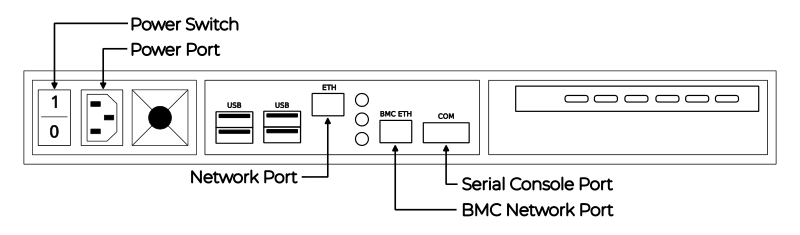
Galinė serverio pusė
Pagal numatytuosius nustatymus BMC lauks adreso priskyrimo per DHCP. Jei DHCP nepasiekiamas, vietinį adresą galima nustatyti naudojant Nmap. Komanda
nmap <network-in-cidr-notation> -p 80 --opengrąžins kompiuterių, turinčių atvirą 80 prievadą, sąrašą.Interneto naršyklėje atidarykite BMC svetainę, naudodami ankstesniame žingsnyje nustatytą IP adresą. Norėdami prisijungti, pagal numatytuosius nustatymus naudokitės šiais prisijungimo duomenimis: vartotojo vardas
bmc_adminir slaptažodis8mCU$3r0nE.Svarbu
Jei BMC žiniatinklio sąsajoje susiduriate su neautorizuoto prisijungimo klaida, tai gali būti trys iš šių priežasčių.
Neteisingas vartotojo vardas arba slaptažodis.
Gamyklinio atstatymo metu BMC sukuria naują TLS sertifikatą. Kai kuriose interneto naršyklėse pasikeitus sertifikatui, kai lieka atidarytas tas pats langas, nepavyksta užmegzti ryšio su klaida. Uždarykite interneto naršyklės langą ir atidarykite naują.
BMC programinė įranga kartais rodo, kad nepriima senesnio sesijos slapuko, kuris vis dar yra žiniatinklio naršyklės talpykloje. Išvalykite žiniatinklio naršyklės talpyklą ir bandykite dar kartą.
Atsisiųstą diegimo programos atvaizdą sumontuokite spustelėję kairėje esantį meniu FRU: Hermes CFL (su TPM) Nitrokey Config, po to submeniu Virtualioji laikmena. Viduryje atidarykite skirtuką usb0, tada spustelėkite mygtuką Attach media.
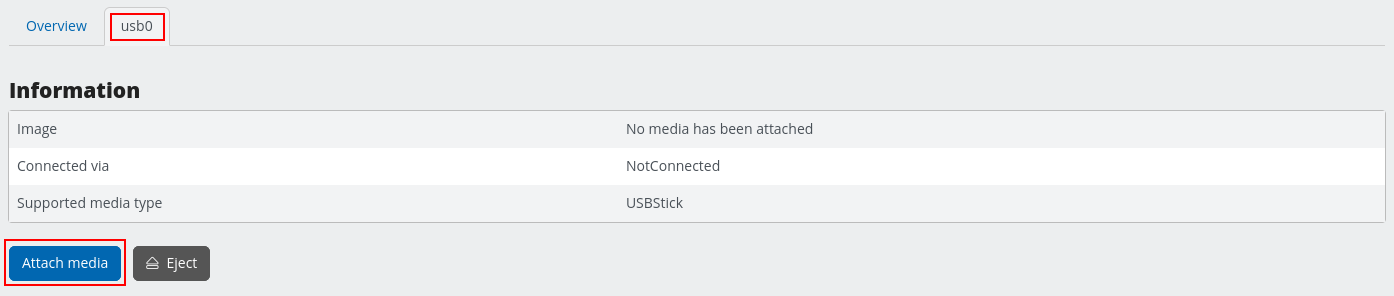
BMC meniu USB įrenginiui prijungti
Atidarymo dialogo lange pasirinkite Siųstis vietinį failą per naršyklę kaip Perdavimo būdą. Spustelėkite mygtuką Browse… (Naršyti…) ir pasirinkite atsisiųstą diegimo programos atvaizdą. Operaciją patvirtinkite mygtuku Submit.
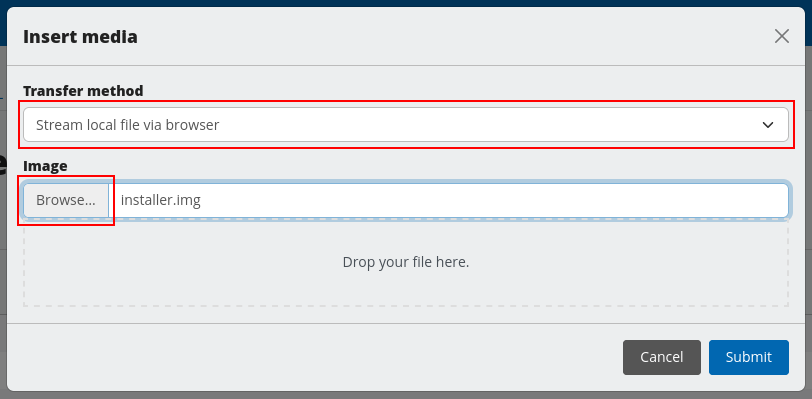
BMC meniu pasirinkite USB atvaizdą
Kairėje esančiame meniu pasirinkite FRU: Hermes CFL (su TPM) Nitrokey Config, tada Remote KVM.
Viduryje spustelėkite Atidaryti plaukiojantį nuotolinį KVM langą mygtuką, esantį viršutiniame dešiniajame VGA išvesties langelio kampe.
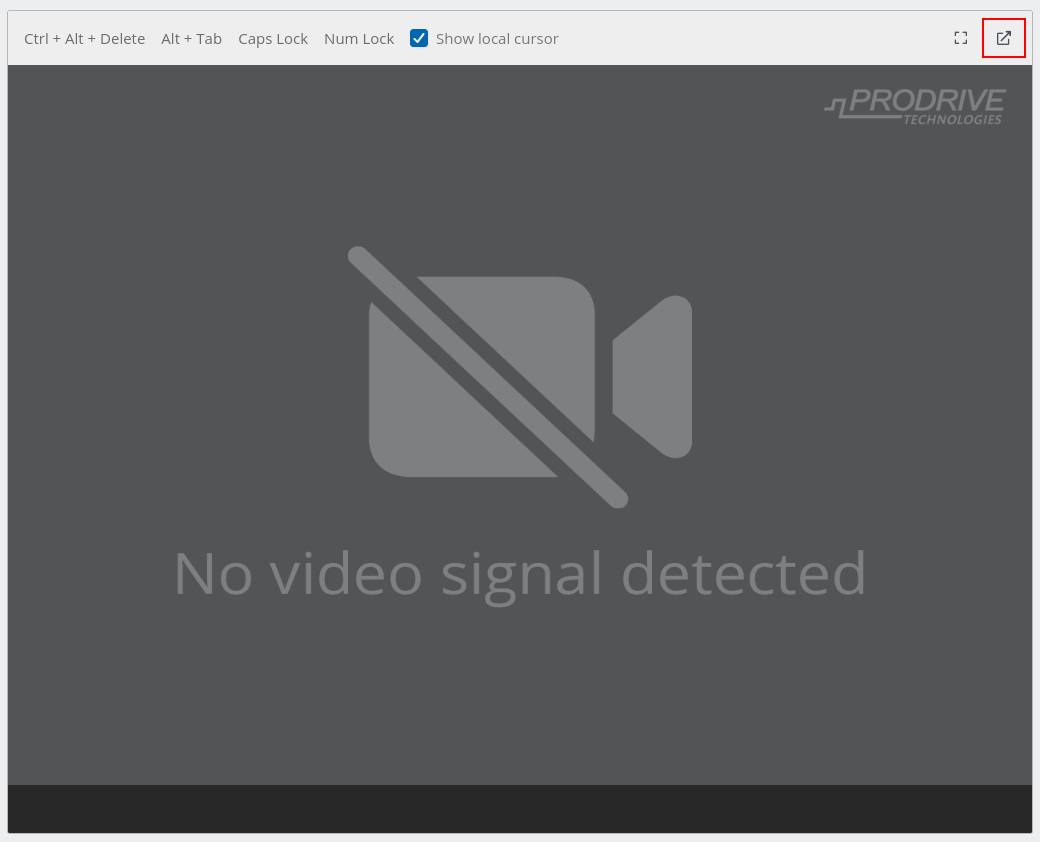
BMC KVM konsolės vaizdas
Šiame lange matysite grafinę NetHSM diegimo programos išvestį. Šį antrąjį langą laikykite atidarytą kartu su pagrindiniu BMC langu.
Kairėje pusėje esančio meniu viršuje pereikite į rodinį Peržiūra.
Laukelyje Override Boot Device (pakeisti įkrovos įrenginį), šalia Select a Boot Device (pasirinkti įkrovos įrenginį) esančiame išskleidžiamajame sąraše pasirinkite USB_BMC-virtual_media.
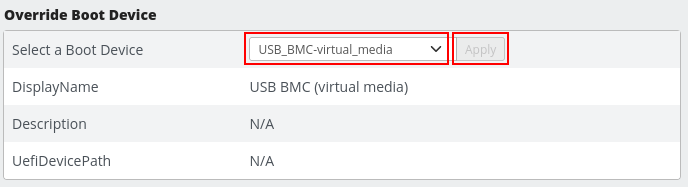
BMC įkrovos įrenginio nustatymas
Laukelyje su pavadinimu FRU: Hermes CFL (with TPM) Nitrokey Config, šalia Power esančiame išplečiamajame meniu pasirinkite On. Patvirtinkite mygtuku Apply.
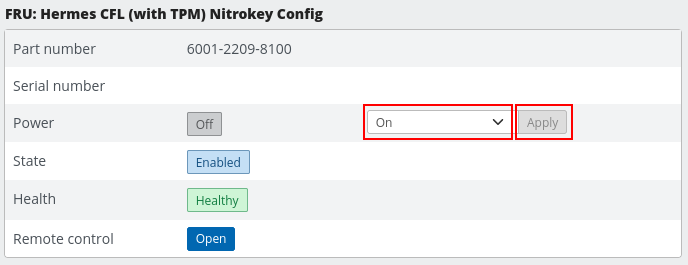
BMC įjungimo nustatymas
Anksčiau atidarytame Remote KVM lange dabar galite matyti diegimo vedlį.
Dabar KVM lange rodomas įkrovos dialogo langas. Patvirtinkite
NetHSM automatic boot (USB or primary system)pasirinkimą klavišu Įveskite.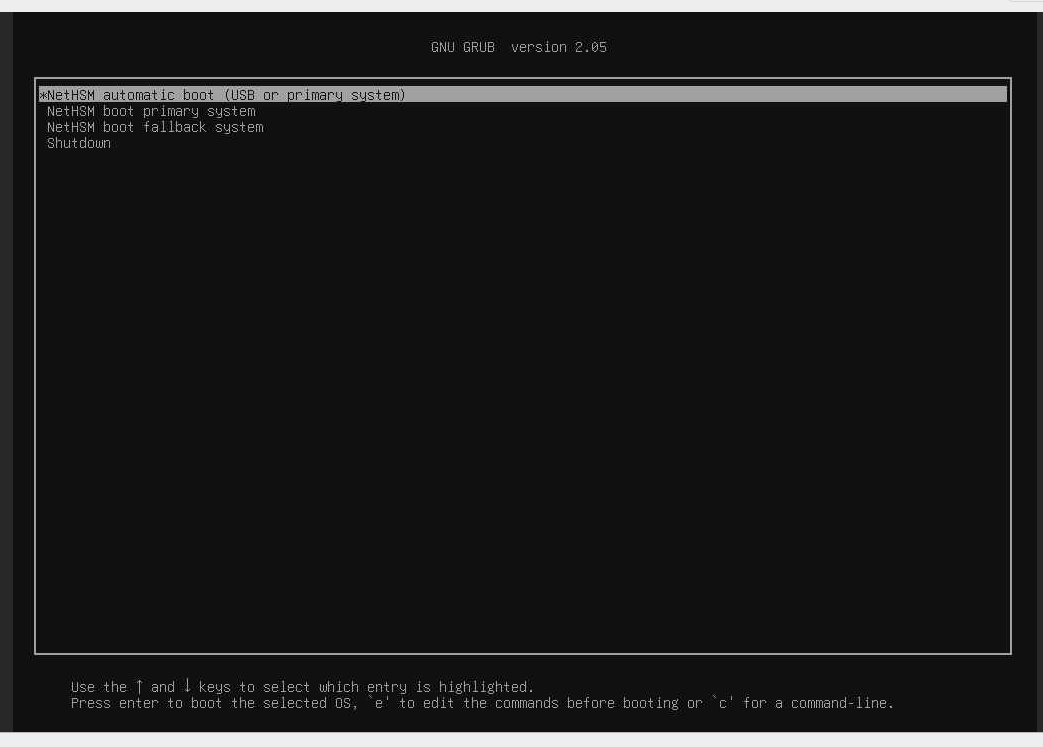
NetHSM įkrovos pasirinkimas BMC KVM konsolėje
Šiame dialogo lange pasirinkimą
NetHSM Software Installerpatvirtinkite klavišu Įveskite.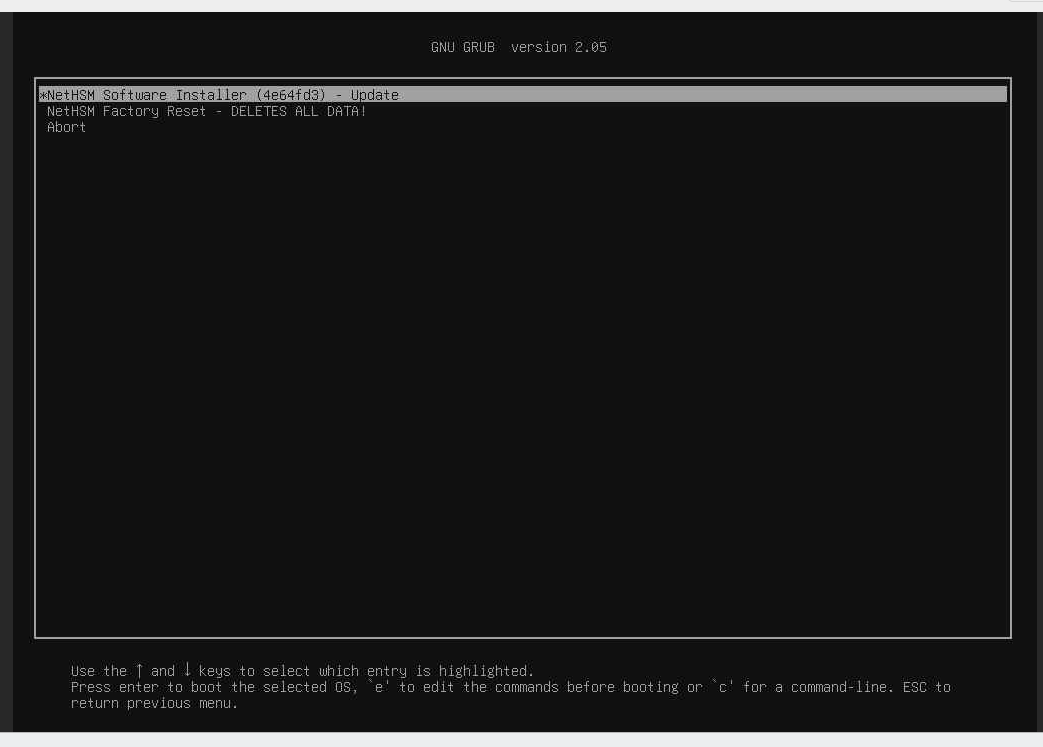
NetHSM diegimo programos pasirinkimas BMC KVM konsolėje
Įspėjimas
Meniu NEpasirinkite
NetHSM Factory Reset - DELETES ALL DATA!. Tai neatstatomai ištrins diske esančius duomenis.
NetHSM diegimo programa įdiegs sistemos programinę įrangą ir ją išjungs.